Order a replacement Business Debit Card
If your card is damaged, you can order a replacement here. If it’s lost or stolen, report this to us immediately.
Still need help?
To get you to the right place, we just need to check a few details with you.
Help and security
Supporting your banking needs
Online banking
Our online services
Accounts and savings
Everyday business banking
Already banking with us?
Borrowing
Loans, cards and finance
Borrowing support
Payments
Making and taking payments
International trade
Business at home and abroad
International support
Insurance
Find the right cover
Insights and resources
Sector, start-ups, run, grow
Corporate solutions
For corporates & institutions
Corporate clients
We have to collect some data from you when you use this website, so it works and is secure.
We'd also like your consent to collect data on how you use our site. This helps us decide which of our products, services and offers may be relevant to you. It also helps us tailor and measure how effective our ads are on other websites, social media, apps and devices, like smart TVs.
Select Accept to agree or Decline to opt out. You can find out more by visiting our Cookie policy.
Some cookies are needed to make our website work and can't be turned off. But we need your consent to use others that are not essential. You can make your choices below and update them at any time from the Cookies link at the end of any page. You can find out more in our Cookie policy.
Strictly necessary
Strictly necessary : These cookies are needed to run our website, to keep it secure, and to obey regulations that apply to us. - Always onFunctional
Functional : These cookies remember your region or country, language, accessibility options and your settings. This also includes things like your User ID on the login page. - Always onPerformance
Marketing
If your card is damaged, you can order a replacement here. If it’s lost or stolen, report this to us immediately.
In the app, go to 'Support' then 'Message us'.
Ask the assistant to ‘Order a replacement debit card’.
You’ll receive your replacement card in 5-7 working days.
In the app, go to 'Support' then 'Message us'.
Ask the assistant to ‘Order a replacement debit card’.
You’ll receive your replacement card in 5-7 working days.
Give us a call and we’ll send you a replacement Business Debit Card.
Lines are open Monday to Friday, 8am to 6pm and Saturday 9am to 2pm, excluding bank holidays.
Call us on 0345 300 0268.
If you’re outside the UK, call +44 131 549 8724.
Not registered for the app?
From August 2026, we're refreshing Business Internet Banking with new branding, an updated design and improved navigation. Over the next few weeks, you may see either the current layout or the new experience. The guidance below will help you with both versions.
Give us a call and we’ll send you a replacement Business Debit Card.
Lines are open Monday to Friday, 8am to 6pm and Saturday 9am to 2pm, excluding bank holidays.
Call us on 0345 300 0268.
If you’re outside the UK, call +44 131 549 8724.
To order a replacement card using Business Internet Banking, you’ll need to log in. Log in to Business Internet Banking
You’ll receive your replacement card in 5-7 working days.
To order a replacement card using Business Internet Banking, you’ll need to log in. Log in to Business Internet Banking
You’ll receive your replacement card in 5-7 working days.

You’ll receive your replacement card in 5-7 working days.
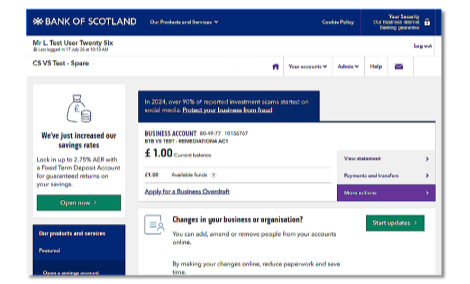
To get you to the right place, we just need to check a few details with you.
We're open Monday to Friday 8am to 6pm, and Saturday 9am to 2pm. This excludes bank holidays.
If you're outside the UK call +44 131 203 3140
We're open Monday to Friday 8am to 6pm, and Saturday 9am to 2pm. This excludes bank holidays.
If you're outside the UK call +44 131 203 3140
You can send an email to:
CommercialClientServicingSME@lloydsbanking.com
We are open Monday to Friday 8am to 6pm, excluding bank holidays.
If you're outside the UK call +44 131 203 3149
You can send an email to:
CommercialClientServicing@lloydsbanking.com