Passkeys for online log in
Passkeys are coming soon to Business Internet Banking – a more secure way to sign in using a device you trust, without a password.
We’ll remove passwords from the sign‑in screen as part of this change. Until then, sign in with your username and either your card reader or memorable information. You’ll still need extra security for some tasks, such as payments.
The benefits of logging in with a passkey
A simpler, safer way to log in
Passkeys are being introduced to make logging in to Business Internet Banking faster and more secure. Watch the video to see how they work and what they’ll mean for you.
Passkeys are coming to Windows first
We’ll roll out passkeys over the next few months, starting with Windows.
Here’s how to set up a passkey on your Window device.
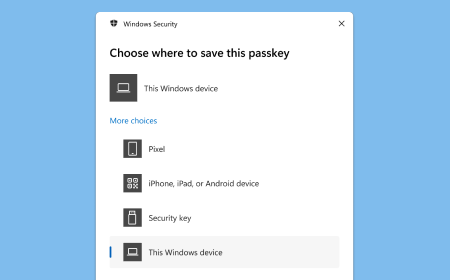
Step 1
Save passkey to ‘This Windows device’.
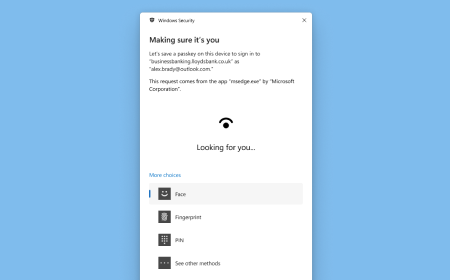
Step 2
Select a way to verify it’s you.
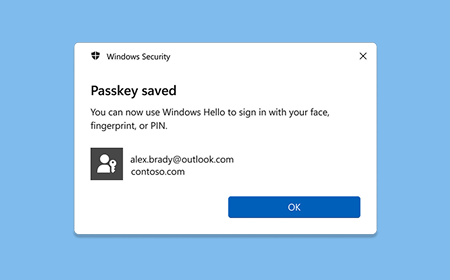
Step 3
A passkey is now saved to your Windows device.
Frequently asked questions
-
Passkey is a modern, password less authentication method. It is an encrypted digital key created on your device. Passkeys are faster, simpler and more secure way to log in to websites.
A passkey is made of two unique keys. One half of the Passkey is stored on your device, and the other half is stored with website owner.
To unlock your passkey, you’ll need your unique face, fingerprint, device pattern or PIN.
-
You can use your passkey to securely log in to your Business Internet Banking account on the web.
-
Yes. Passkeys offer improved security and a smarter way to prove it’s you.
Based on Fast Identity Online (FIDO) Standards, passkeys offer stronger protection against online fraud, as they can’t be guessed or shared.
-
In some organisations, devices may be shared, but each user has their own unique user ID and login credentials (rather than a shared account).
Before creating a passkey on a shared device, we recommend checking your organisation’s IT policies to make sure this is allowed.
When you create a passkey for Business Internet Banking, you confirm that only you will have access to your account.
A passkey should not be created on a public device.
-
You can view and manage your private passkey in your device settings. If you're not sure how to do this, check with your device manufacturer.
-
Yes. Your passkey is designed to stay secure, even if your device is lost or stolen.
It’s made up of two linked keys:
- A private key that stays securely on your device
- A public key that’s stored by Lloyds.
Both keys are needed to sign in.
If you lose your device, just contact us and we’ll remove the public key from your account. Once it’s removed, the passkey on your lost device will no longer work.
-
If you change your device, you’ll need to create a new passkey on the new device.
-
No. Your biometric data like your face and fingerprint is kept secure by your device. It's never stored by us or shared.
-
You’ll need to set up a passkey on each device you use, as passkeys are device-specific.
We’re working on enabling passkey syncing across devices in the future, but this feature isn’t currently available.
-
Yes. Some older browsers and devices may not support passkeys. If this applies to you, try updating your browser or using a more up-to-date device.
-
Passkeys will be available on Windows devices first. If you’re using a different device, you’ll be able to use passkeys in the future as we expand support.